Entities#
An Entity represents an independent object that exists within a scene/game world. This can be player or enemy
characters, environment objects or non-visual elements like a game manager.
Entity Lifecycle#
For an entity to do anything useful, we need to hook into its lifecycle to write custom logic. This can be done by
extending the Entity class and overriding lifecycle methods as shown below:
MyObject.java
import dev.gamekit.core.Entity;

public class MyObject extends Entity {
  public MyObject() {
    super("Entity Name");
  }

  @Override
  protected void start() { }

  @Override
  protected void update() {  }

  @Override
  protected void render() {  }

  @Override
  protected void stop() {  }

  @Override
  protected void restart() {  }

  @Override
  protected void dispose() {  }
}
| Lifecycle | Description | State Before | State After |
|---|---|---|---|
start |
Called once to initialize itself | State.NEW |
State.ACTIVE |
update |
Called continuously to update itself | State.ACTIVE |
State.ACTIVE |
render |
Called continuously to render itself | State.ACTIVE |
State.ACTIVE |
stop |
When parent calls removeChild(Entity), this is called before removal |
State.ACTIVE |
State.INACTIVE |
restart |
When parent calls addChild(Entity) on an inactive entity, this is called |
State.INACTIVE |
State.ACTIVE |
dispose |
Called when scheduled for destruction using destroy() |
State.ACTIVE |
State.DOOMED |
Entity Members#
These are other publicly available entity members:
| Method | Description |
|---|---|
logger |
The Log4j logger object of the entity instance |
getParent |
Returns the entity's parent entity |
getState |
Returns the current state of the entity |
addChild |
Adds a child entity at the end of the current frame |
removeChild |
Removes a child entity at the end of the current frame |
findComponent |
+1 Returns the first component matching the given class+2 Returns the first component matching the given class and passing the provided filter |
findComponents |
Finds all component matching the given class and inserts them into the provided out list |
destroy |
Marks the entity as DOOMED and schedules it for destruction at the end of the current frame |
Scenes#
A Scene is a collection of entities that makes up a logical part of your game. This can be a main menu, settings page
or a level within your game.
Scenes are actually special entities that can create and manage their own user interface. As such, scenes have the same lifecycle as entities and inherit their public and protected members.
The sample below shows a custom scene class:
import dev.gamekit.core.Scene;

import java.awt.Color;

public class CustomScene extends Scene {
  public CustomScene() {
    // The scene name will be used in logs
    super("Hello Game");
  }
}
User Interface#
As mentioned previously, a scene can create and manage its own user interface. This is done by overriding the createUI
lifecycle method and returning the interface description.
The sample below shows the UI for a bottom-center aligned text with 48px padding and content "Hello World":
import dev.gamekit.core.Application;
import dev.gamekit.core.Scene;
import dev.gamekit.core.Renderer;
import dev.gamekit.ui.enums.Alignment;
import dev.gamekit.ui.widgets.Align;
import dev.gamekit.ui.widgets.Padding;
import dev.gamekit.ui.widgets.Text;
import dev.gamekit.ui.widgets.Widget;

import java.awt.Color;

public class UIShowcase extends Scene {
  public UIShowcase() {
    super("UI Showcase");
  }

  public static void main(String[] args) {
    Application game = new Application("UI Showcase") { };
    game.loadScene(new UIShowcase());
    game.run();
  }

  @Override
  protected void render() {
    Renderer.clear(Color.BLACK);
  }

  @Override
  protected Widget createUI() {
    return Align.create(
      props -> {
        props.horizontalAlignment = Alignment.CENTER;
        props.verticalAlignment = Alignment.END;
      },
      Padding.create(
        48, Text.create(
          props -> {
            props.text = "Hello World";
            props.fontSize = 32;
            props.alignment = Alignment.CENTER;
            props.fontStyle = Text.BOLD;
          }
        )
      )
    );
  }
}
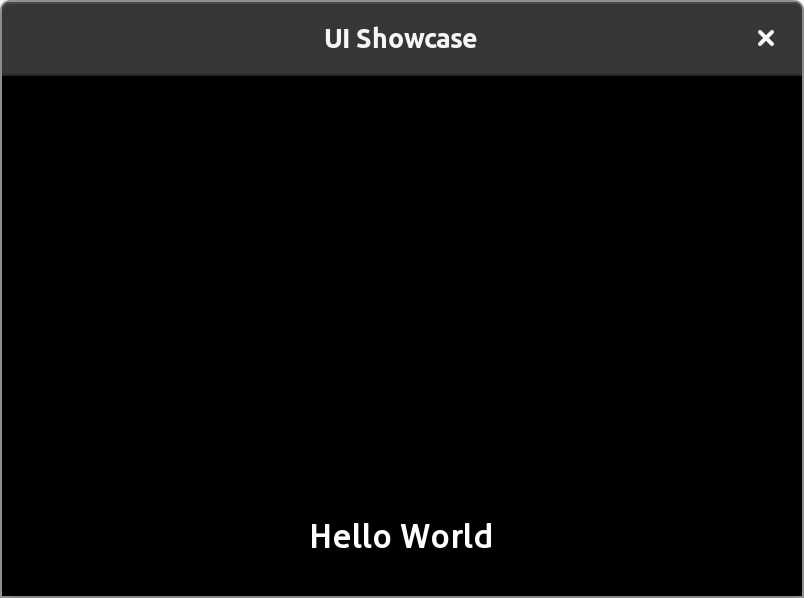
This is just a simple use case showcasing how easy it is to create declarative UI with GameKit. The topic of UI is explored in much more detail in a later section.
Next Steps#
Now that you are familiar with entities and scenes, we recommend you check out our examples sections for related samples to strengthen your understanding on the topic.
Next, we explore components which are mechanisms for attaching behaviours to entities.