Application#
The application class is the heart of a GameKit program. You must extend this class to do anything useful with the engine. An example is shown below:
import dev.gamekit.core.Application;

public class MyGame extends Application {
  public MyGame() {
    super("My Game");
  }
}
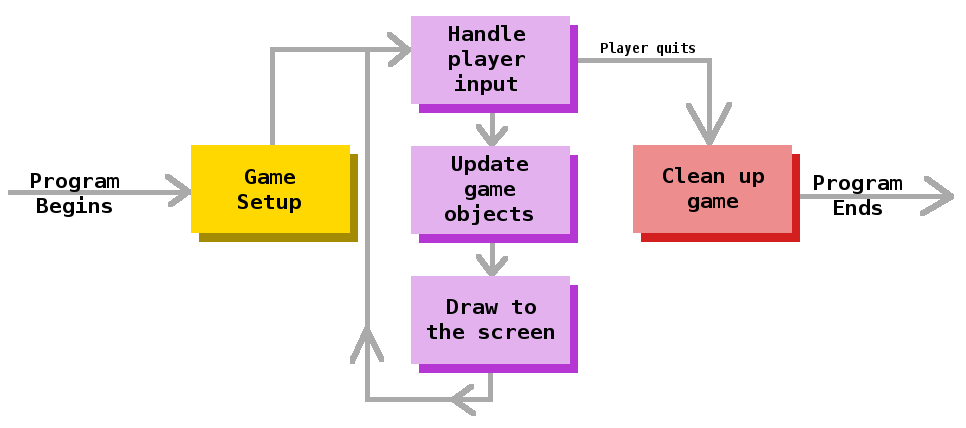
It runs a fixed-step game update loop which protects against lag spikes. It also manages scenes, schedules animations and timeouts and provides methods to manage the running instance.
Application splits its workload into four (4) threads to handle the game update loop, rendering, audio and physics
updates. This multithreaded setup improves performance on multicore processors dramatically, since each thread is
independent of each other.
Configuration#
The simplest way to configure an application instance is providing a window title string.
Application app = new Application("Title Goes Here") { }
Since
Applicationis an abstract class, we need to extend it for a concrete implementation or use anonymous subclass instantiation as shown above
An application instance can also accept a Settings object which allows you to specify more settings.
Application game = new Application(
  new Settings(
    "Demo 4 - Declarative UI",  // Window title string
    Resolution.HD,              // Resolution (VGA, SVGA, XGA, HD, WXGA, FULL_HD, NATIVE)
    WindowMode.WINDOWED,        // Window mode (WINDOWED, BORDERLESS, FULLSCREEN)
    Antialiasing.ON,            // Antialiasing (ON, OFF, DEFAULT)
    TextAntialiasing.ON,        // UI text antialiasing (ON, OFF, DEFAULT)
    AlphaInterpolation.SPEED,   // Image alpha interpolation (SPEED, QUALITY, DEFAULT)
    ImageInterpolation.NEAREST, // Image pixel interpolation (NEAREST, BILINEAR, BICUBIC, DEFAULT)
    RenderingStrategy.SPEED,    // Overall rendering priority (SPEED, QUALITY, DEFAULT)
    Dithering.OFF               // Dithering (ON, OFF, DEFAULT)
  )
) { };
Public Methods#
| Method | Description |
|---|---|
loadScene |
Loads a new scene at the end of the current frame |
scheduleTask |
+1 Schedules a task to run immediately after the current frame+2 Schedules a task to run after some time has elapsed |
run |
Starts the game loop of an application instance |
quit |
Quits the running application instance |
Static Methods#
| Method | Description |
|---|---|
getInstance |
Returns the running application instance |
Next Steps#
You're now familiar with the Application class. Next, we'll look at entities & scenes which are building
blocks for more complex games.